Seat management at universities: bulk, real-time control
Adjust the capacity of your course offerings in bulk and in real time.
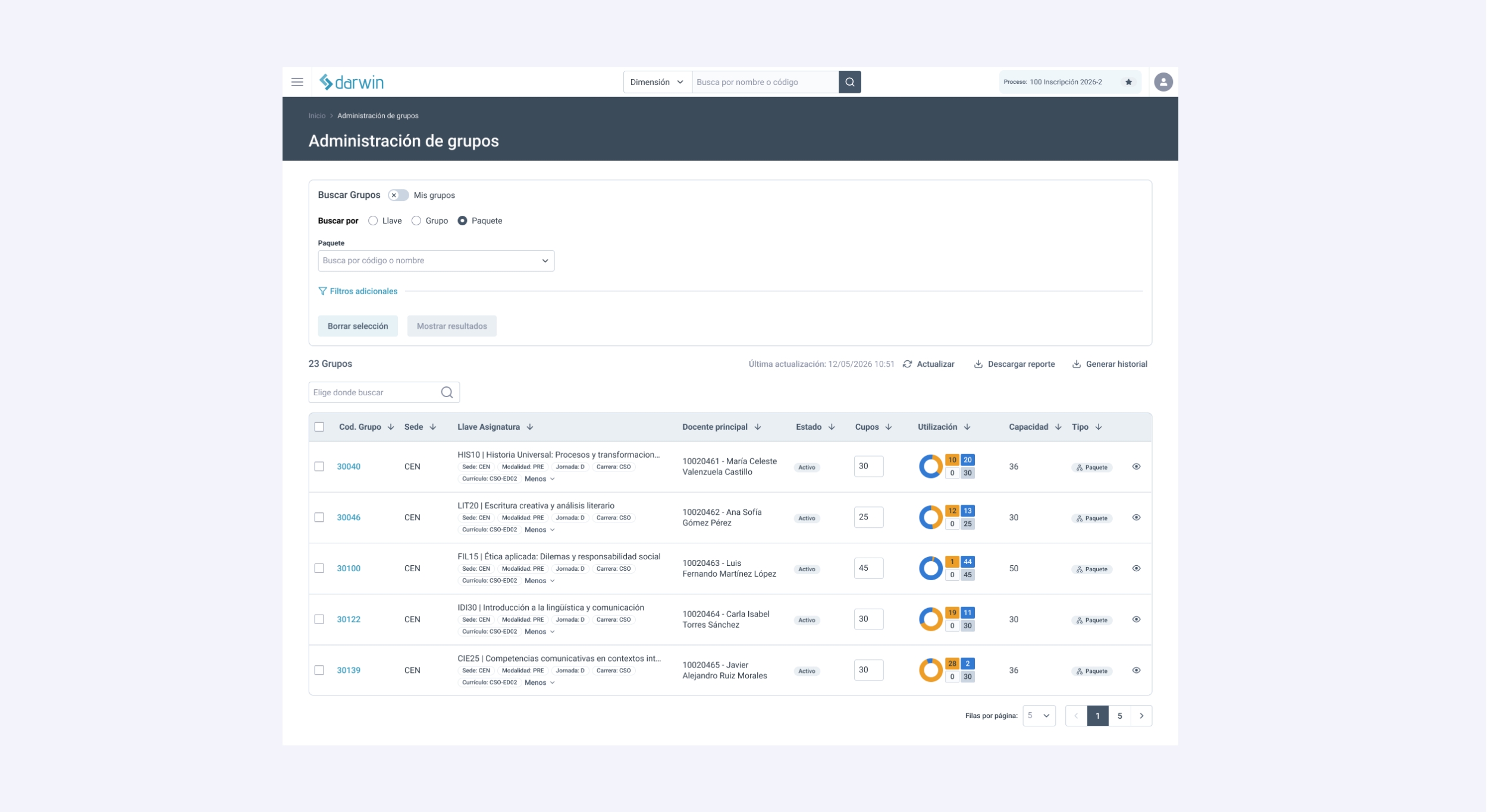
The Seat Manager is a feature of the Darwin Schedule Editor for managing and editing the seats in the course offerings, with automatic, real-time syncing with the enrollment system (Albus). It replaces reactive seat management between planning and enrollment, eliminating manual validations and errors that affect students when they enroll.
Academic planning does not end with creating sections. One of the most critical moments comes afterward, when teams have to define how many students can enroll and adjust seats to demand, quickly and without losing the consistency of the course offerings.
At many universities, this work is still manual and fragmented, which limits their ability to react in time, especially at peak moments.
Darwin solves this challenge by building seat management directly into the academic planning workflow, with logic designed to operate at scale.
What is the Seat Manager?
The seat manager is a feature within the Darwin Schedule Editor for managing and editing the seats in the course offerings.
Beyond centralizing information, its value lies in its direct connection with the enrollment process. Every seat adjustment is synced automatically with the university's enrollment system (Albus or another), ensuring that the availability students see is always accurate and up to date.
Seat management thus becomes a natural part of day-to-day work, supporting academic operations in real time.
Why does seat management fail at universities?
Managing seats seems simple until you scale. When there are thousands of active sections, any adjustment means going through multiple views, validating data by hand, and making sure there are no inconsistencies between academic planning and the capacity actually available. For example, the number of students allowed has to match the size of the classroom or the available resources. Classroom capacity, actual demand, and operational decisions are not always aligned in one place.
The result is a slow process that is hard to audit and highly error-prone. Most critically, any inconsistency directly affects students at the moment they enroll.
How Darwin manages seats in bulk
The seat manager changes how universities manage academic capacity. Instead of working section by section, teams can work on the entire course offering in a centralized, bulk way, with a complete view of available seats, demand, and operational constraints. In addition, for every change, the system runs a validation before confirming the adjustments, which reduces errors and saves operational time.
This approach reduces manual effort, but its impact goes beyond efficiency. With consolidated, up-to-date information in one place, teams can make faster decisions that are aligned with the institution's actual situation.
Moving from individual to bulk management is more than a usability improvement: it shifts how the team operates, as seat management gains weight and becomes a key part of the strategy.
Four capabilities of the Seat Manager
-
A cross-cutting view of the course offerings that lets teams understand and manage capacity across multiple dimensions, such as link, section, or entire packages. It makes it easier to spot bottlenecks and adjust quickly.
-
Automatic validations keep capacity and demand consistent, ensuring that seats respect physical capacity and the actual state of enrollment, without relying on manual reviews.
-
Each university defines its own capacity rules, aligning seat management with its academic and operational criteria.
-
When events such as high demand occur, the system adjusts seats automatically within the defined limits, reducing the need for constant manual intervention.
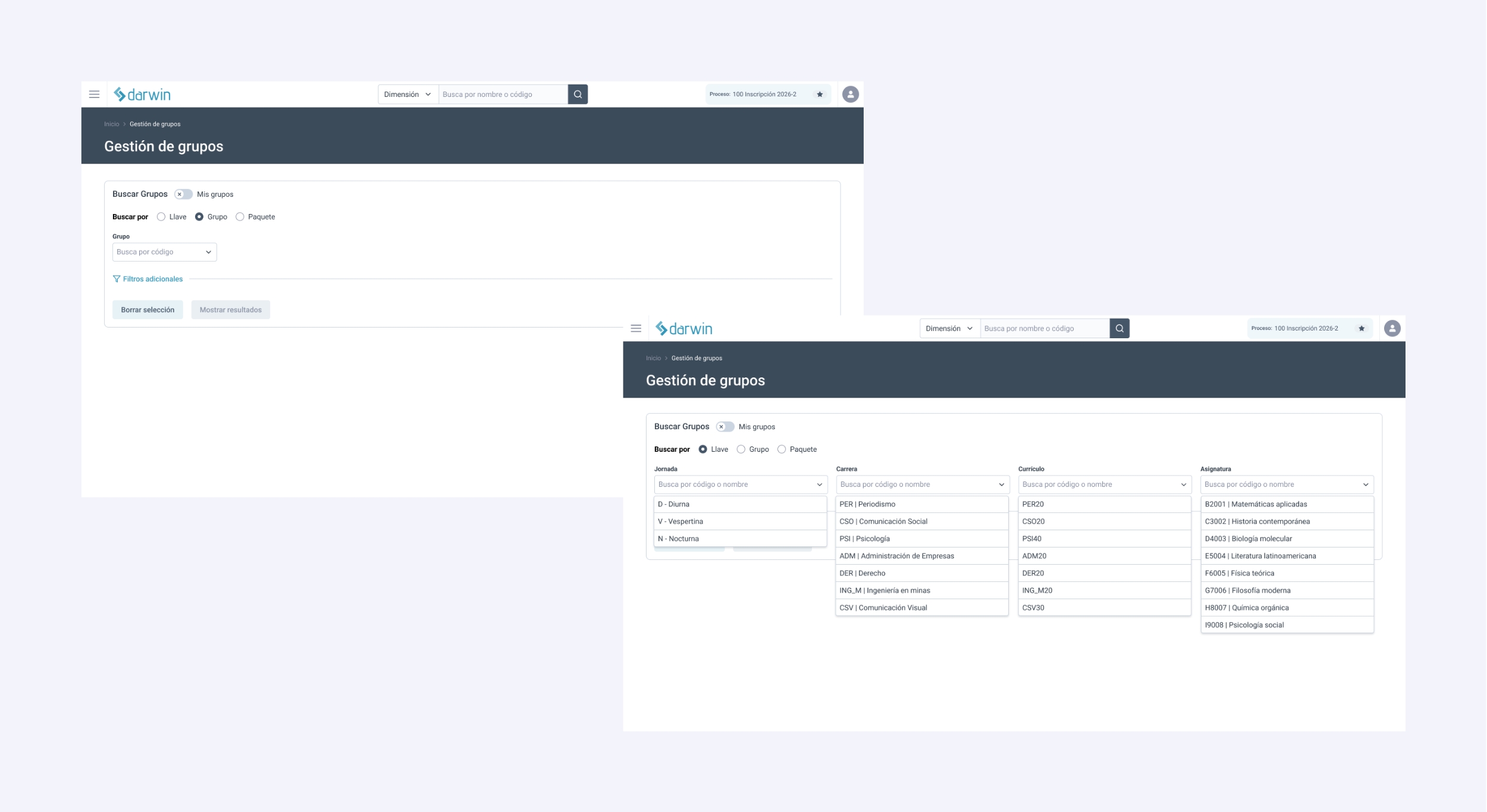
How does the Seat Manager change daily operations?
The impact shows in the speed and quality of decisions in academic seat management. Teams spend less time on manual validations and can focus on optimizing the course offerings from a more strategic perspective. Information stays centralized, capacity rules are clear, and any change is immediately reflected across the entire operation.
Real-time syncing with the enrollment system ensures that what is defined in planning is exactly what students see when they enroll, eliminating inconsistencies between available seats and published seats.
As a result, uncertainty goes down, over-enrollment and incorrect restrictions are avoided, and the enrollment experience improves for both students and academic teams.
What sets the Seat Manager apart from other systems
In many systems, seat management is an operational task limited by how users access the information. They have to go through multiple screens, open each section one by one, or work on partial views to make adjustments. This fragments the logic and makes it hard to get a complete picture.
Darwin takes a different approach: academic capacity is managed as an integral part of planning, directly connecting the course offerings with demand at enrollment and avoiding inconsistencies and rework.
It also brings automation to seat management, since rules validate conditions and can trigger actions automatically, enabling a more agile operation that adapts to demand.
Managing academic seats should not depend on manual processes or constant adjustments on the fly. When capacity is managed centrally, with clear rules and in real time with the enrollment system, academic planning becomes more precise and operations become predictable.
If your university currently manages seats with manual validations or limited tools, you are operating with constraints that directly affect efficiency and the student experience. Adopting a bulk, automated seat management model connected to enrollment redefines the standard for how academic planning should operate.
If you want to see it in action and understand how to apply it at your university, let's talk.
Frequently asked questions
What is the Darwin Seat Manager?
It is a feature within the Darwin Schedule Editor for managing and editing the seats in the course offerings in bulk. It centralizes capacity management and syncs it automatically with the enrollment system, so the availability students see always reflects operational reality.
How are seats synced with the enrollment system?
Every seat adjustment made in Darwin is synced automatically and in real time with the university's enrollment system (Albus or another). This eliminates inconsistencies between planning and enrollment and ensures students always see up-to-date course offerings when they enroll.
What kinds of capacity rules can be configured?
Each university can define its own limits and criteria to align seat management with academic and operational decisions. The rules validate conditions such as a classroom's physical capacity and operational constraints, and they can trigger actions automatically in response to events such as high demand.
Does Darwin integrate with enrollment systems other than Albus?
Yes. While syncing with Albus is native and happens in real time, the Darwin Seat Manager is designed to integrate with other institutional enrollment systems, keeping updates between planning and enrollment automatic.